Items, combat, and other players
September 3, 2026Three things landed this time, and they are the ones that make it start to feel like the game and not a walking simulator: a real inventory, real combat, and the first player versus player.
Items
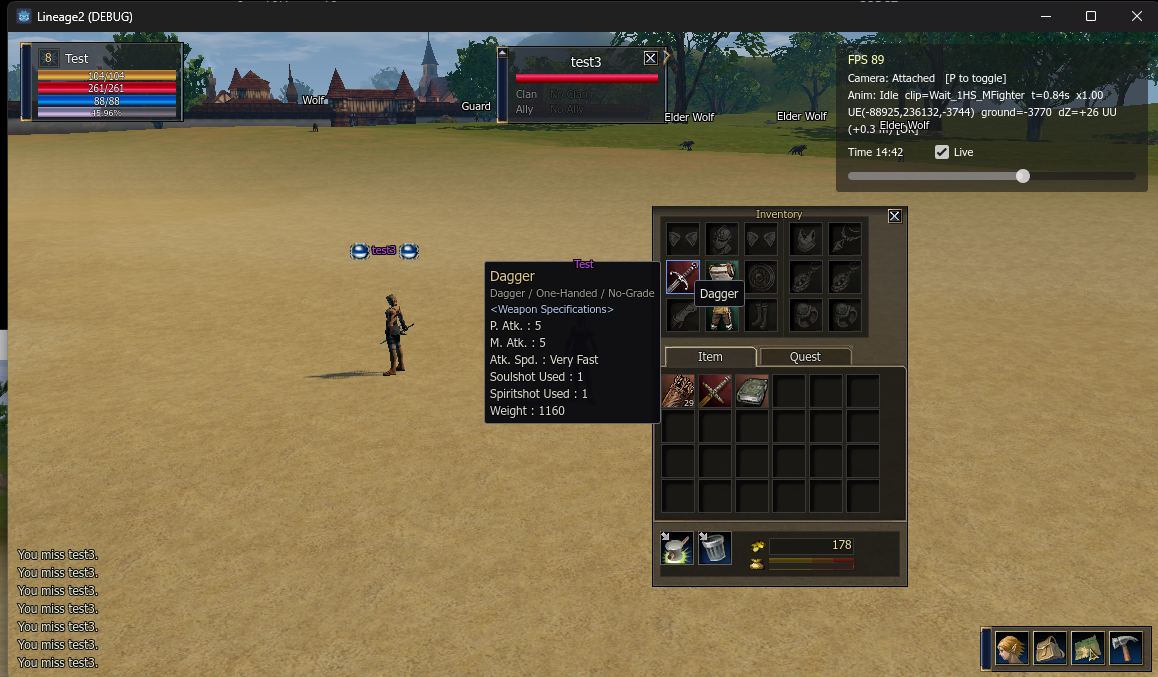
The inventory window is now the real one. It is built from the original Lineage 2 interface art, the same window with the paperdoll on top and the item grid below, the two tabs, the adena count and the weight bar. I keep it as an editable scene so I can move things around in the editor instead of guessing numbers in code.
The harder part was the items themselves. When you enter the world the server sends you a
list of everything you carry, but each item is just numbers: an id, a count, whether it is
equipped, an enchant level. To turn that into something you can read I had to go back into the
client files. The names, the descriptions, the icons and the stats all live in encrypted
.dat files, so I decrypted them and pulled them into small tables the game can read.
Now every item has its real name, its real icon, and a tooltip with the real stats. For a weapon that is P. Atk, M. Atk, attack speed, soulshot and spiritshot use, and the weight. For example the starting dagger, straight out of the decrypted table:
"10": {
  "t": "weapon", "w": 1160, "hand": 1,
  "patk": 5, "matk": 5, "spd": 433,
  "ss": 1, "sps": 1, "wt": 3
}
spd 433 is the fastest attack speed group in the game, so the tooltip shows “Very Fast”,
and wt 3 means it is a dagger, so the type line reads “Dagger / One-Handed / No-Grade”. That
lines up exactly with what the real client shows for that item.
Equipping works the way it does in L2. You drag an item onto the paperdoll, or right click it, or double click it, and the character equips it. The important thing is I do not decide that on my side. I tell the server “use this item”, and the server is the one that equips or unequips it and sends the inventory back changed. The window just draws whatever the server last said I have.
Hitting things
My character can fight now. You click a wolf once to target it, and click it again to attack. The character walks into range on its own, faces the wolf, and swings. The swing is the real animation for the weapon you hold, so a dagger, a sword and a bow all look different.
Like everything else, the hit is not mine to decide. The server sends an attack packet when the swing starts, and a separate status update at the moment the hit actually lands, with the new health. So the swing plays on my side, but the health bar only drops when the server says the hit connected, and a miss just says miss. I had to line those two up on purpose, otherwise the numbers and the animation drifted apart. The little combat log in the bottom left is fed from the same two packets.
When a wolf dies it plays its death animation and drops, and the server cleans up the corpse a moment later.
Other players
The last one is the first real PvP. With two clients logged into the same server I can attack the other player.
A normal click on another player just follows or interacts with them, it does not hit them. To actually start a fight you hold Ctrl and click, which is the force attack, same as retail. The moment you hit someone their name turns purple, that is the flag, and it blinks near the end before it wears off. If you kill someone who is not flagged you go red instead, that is karma. None of that is on my side either. The server runs all the timers and just tells the clients “this player is purple now”, and the name plate reads the color from that.
Where this leaves me
So now I can carry real items with real stats, equip them, kill the wolves around town, and turn on another player. It is still basic melee, no skills yet, no potions, no soulshots actually firing. That is the next block: skills and the effects that go with them.
A small correction
One fix to an earlier post. Back in Part 2 I credited the water to the wrong shader. The one actually rendering the sea is “Realistic Water with Traced and Simple Reflection and Refraction” by smallcableboi (CC0), from godotshaders.com. I later swapped it in and tuned it down a bit so it stopped sparkling at midday, and I never went back to fix the credit. Doing that now.