Getting the map terrain out of Lineage 2 and into Godot
August 21, 2026This is the first real post, so let me say quickly why I am doing this.
I played Lineage 2 since C1, back when I was in high school. I spent so many afternoons in the same grind spots, talking to people, making a party, waiting for a raid. I met a lot of people there and some of them became real friends. I always missed those days. So I decided to try something a bit crazy: take the old Interlude client apart and rebuild its world inside Godot 4, piece by piece, and write down what I learn.
The first piece is the ground itself. If I can walk on one real map tile in Godot, with the real shape and the real textures, then everything else has a place to stand on. So that was the goal for this step.
Here is where I ended up, one single map tile running in Godot 4. Real shape from the original heightmap, painted with the original textures, and matte like the old game. The tile is called 17_25, and it is a piece of Talking Island. This is the part where Talking Island Village sits, and where the human fighter respawns, so if you started a human character you already walked all over this ground. One tile is big, so it already covers a good chunk of the map:
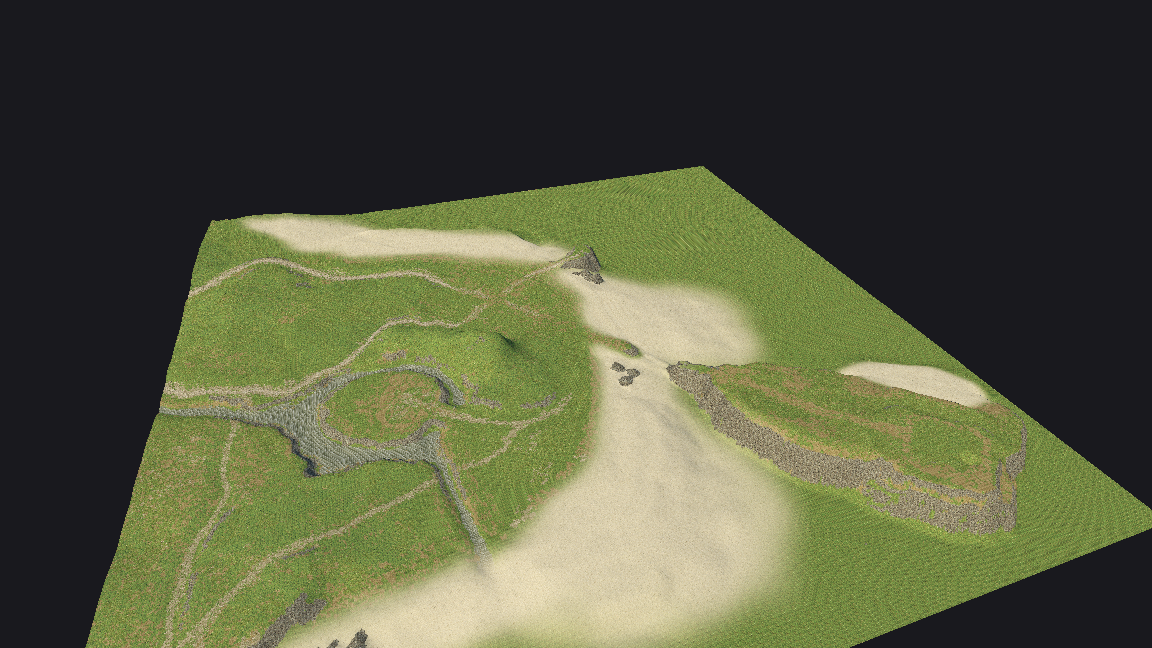
Now let me go step by step on how I got there.
Step 1: the map files are locked
Lineage 2 stores each map tile in a .unr file. These are Unreal Engine 2 packages,
but the L2 Interlude client does not leave them as plain data. They are encrypted with
a very simple XOR. Every byte is xored with one key. For version 111 the key is a fixed
0xAC. For version 121 the key is the first byte of the content xored with 0xC1.
Once I understood that, the “decryption” was tiny:
var xor_key := 0
if ver_str == "111":
    xor_key = L2_XOR_KEY_V111        # 0xAC
elif ver_str == "121":
    xor_key = content[0] ^ L2_XOR_SEED_V121   # first byte ^ 0xC1

for i in content.size():
    content[i] = content[i] ^ xor_key
After this the file is a normal UE2 package. That means it has a name table, an import table and an export table, and every object inside is a list of tagged properties. I had to write a reader for all of that in GDScript, including the “compact index” encoding that Unreal uses for its variable length integers. That part was slow and boring but it is the door to everything else, so there was no way around it.
Step 2: reading the heightmap
Inside the terrain object there is a heightmap. It is a 256x256 texture where every pixel is a 16 bit height. The value is not in meters, it is in Unreal Units, and it is centered around 32768 (the middle of a 16 bit number). So to get a real height I take the value, move it down by 32768, apply the terrain Z scale, and convert to meters.
# 1 Unreal Unit is about 1 cm
var uint16_val := lo | (hi << 8)
pixels[i] = (float(uint16_val) - 32768.0) * z_scale / 256.0 * UU_TO_METERS
Terrain3D (the Godot addon I use for the ground) wants a raw .r16 file, so I write
the heights back out in that format. Nothing exciting here, but getting the scale right
matters a lot. If you get it wrong the whole map is either a flat pancake or a wall of
spikes.
Step 3: the textures
Each terrain layer points to a texture. In L2 these are stored inside .utx packages,
most of them as DXT1 compressed images at 256x256. Some are DXT5, some are plain 8 bit
paletted. One annoying detail: Unreal’s texture format enum is not the same as Godot’s.
For example format value 5 is plain RGBA in UE2, but in Godot the same number means
something else. So I keep a small table and decode by hand.
After decoding I just save each one as a PNG. Here are a few of the real ground textures from the tile, grass, rock, sand:
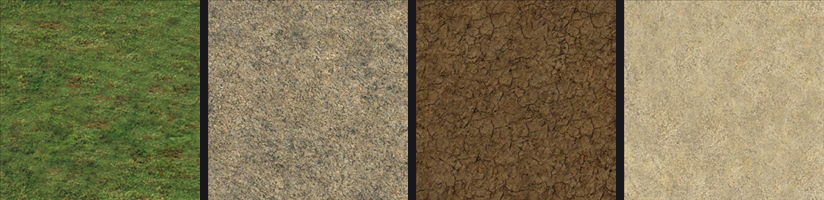
These are the exact ground textures the original tile uses.
Step 4: which texture goes where (the splatmap)
A terrain tile does not use one texture, it blends many. Grass here, a dirt road there, sand near the water. Unreal stores this as one alpha map per layer. Each alpha map is a grayscale image where white means “use this layer a lot here” and black means “not here”.
The funny thing is that when you look at these alpha maps together, you can already see the shape of the map. Roads, clearings, the edge of the water. It looks like an old treasure map:
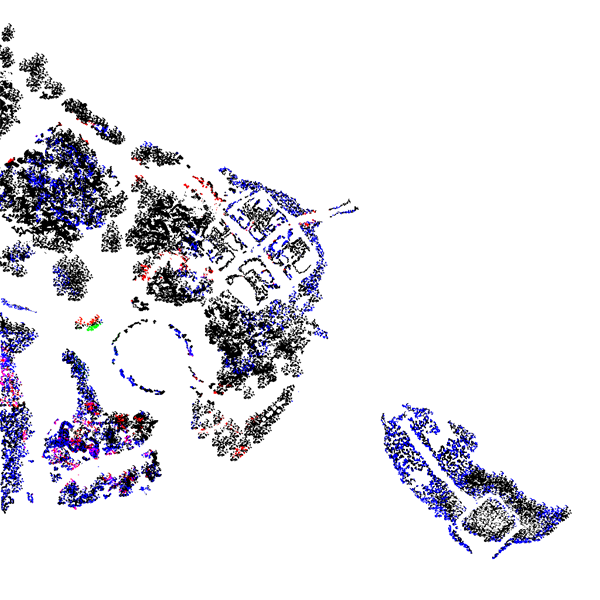
Terrain3D does not want one image per layer though. It wants one “control map” where each pixel says: this is the base layer, this is the layer on top, and this is how much to blend between them. So for every pixel I look at all the layers, find the two strongest ones, and pack that into a single 32 bit integer with some bit shifting:
var packed := 0
packed |= (base_id & 0x1F) << 27     # bottom layer
packed |= (overlay_id & 0x1F) << 22  # top layer
packed |= (blend & 0xFF) << 14       # how much to mix them
packed |= (hole & 0x1) << 2          # is there a hole here
control[pixel_idx] = packed
The alpha maps are low resolution and DXT compressed, so the raw blend looks blocky. I run the weights at double resolution and put a small blur and a smoothstep curve on the blend, so the roads fade into the grass softly instead of with hard stairs. Small thing, but it makes the ground look natural instead of like a puzzle.
If I take all the layers and their weights and composite them into one flat image seen from above, this is the whole tile’s ground. It is basically a preview of what the terrain will be painted with, before any 3D. One tile is big enough that it already looks like a full region:
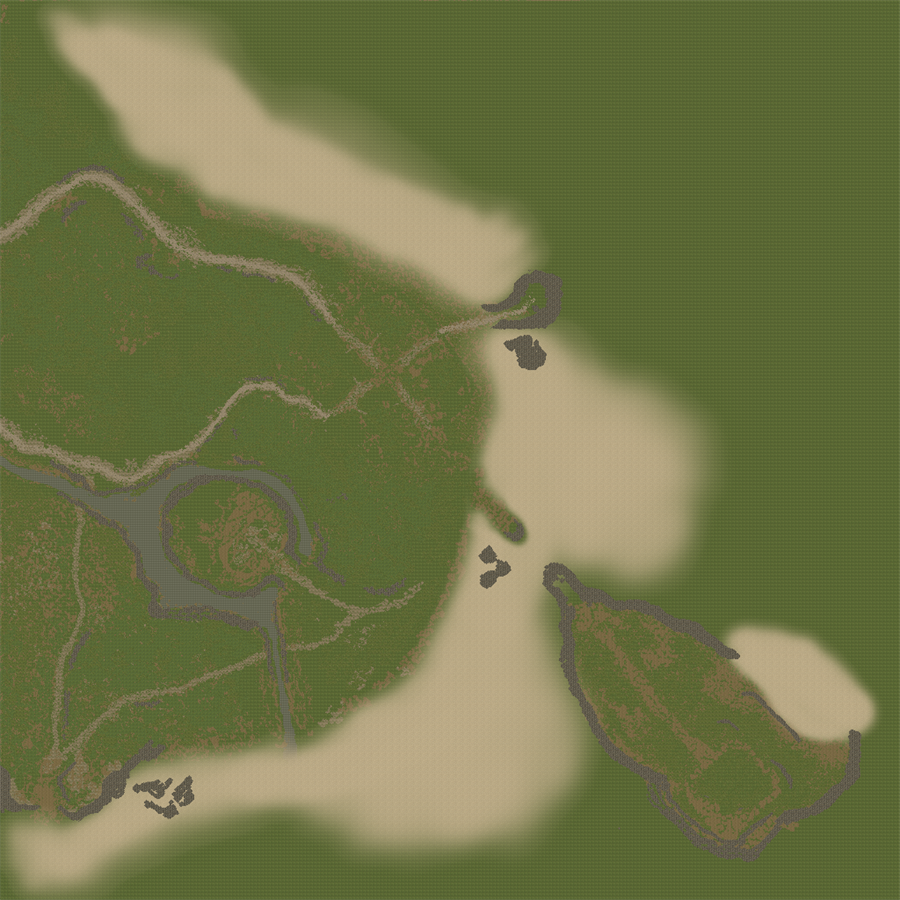
Step 5: putting it in Godot, and the wall I hit
Here is where I lost a full evening. My first plan was to use Terrain3D, a C++ addon for Godot, to hold the data and draw the ground. It is fine with one or two texture layers, but this tile uses around nine. As soon as I needed more than two layers blended together, I could not get its texturing to do what I wanted. On top of that its material is a black box for custom shaders. I tried to push my own shader uniforms into it in five different ways, and every time the call looked like it worked but the value never reached the shader. Reading it back gave me null.
After enough tries I dropped Terrain3D completely. In the end it is not used at all. I
build the ground myself instead: an ArrayMesh from the heightmap, with a normal Godot
ShaderMaterial that reads my control map and blends all the layers by hand. On a plain
ShaderMaterial setting parameters just works, so I have full control over how the textures
mix.
The lesson I wrote down for myself:
If you need more than a couple of blended layers, or any custom look, do not fight Terrain3D. Build the mesh yourself and use a normal ShaderMaterial.
One more small but important detail about the look: L2 ground is matte. The default Godot material has a bit of specular shine on everything, and it makes the grass and rocks look wet and plasticy, nothing like the old game. So I kill it everywhere:
ROUGHNESS = 1.0;
SPECULAR  = 0.0;
That one line changed the whole feeling from “3D asset” back to “Lineage 2”.
Where this leaves me
At the end of this step I can load one real map tile, the ground has the correct shape from the original heightmap, it is painted with the original textures blended the way the original map blends them, and it looks matte like the old game.
It is only the ground so far. No buildings, no trees, nothing standing on it yet. But it is the tile that proves the pipeline works, and it is a piece of Talking Island.
The next big fight was putting the static meshes on top of it, the walls, the houses, the rocks, and the trees. That one deserves its own post, because the way Unreal stores rotation almost broke me. I will write that one next.