Buildings, trees, water and sky
August 27, 2026In the last post I got the ground of a Talking Island tile into Godot. Just the ground though, empty grass and dirt. A real map has buildings, walls, rocks, bridges, and trees all over it, and none of that was there yet.
This post is about putting all of that on top. It sounds simple. It was not. The way Unreal stores rotation fought me for days, and I only really understood it after I sat down and copied how l2mapper does it.
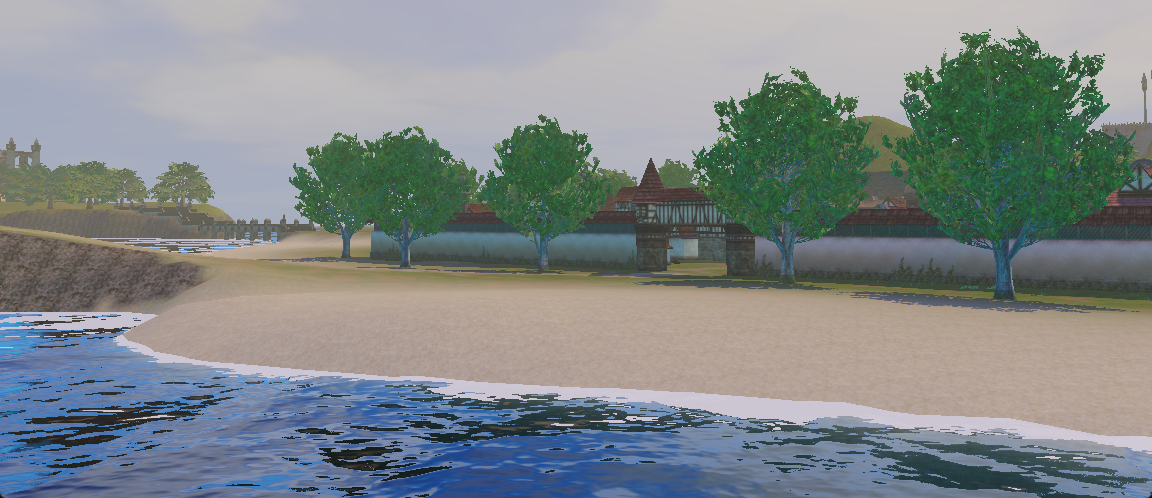
Here is the tile from last time, but now with everything on it. This is the Talking Island coast, standing on the beach looking at the village wall and gate, with the trees, the water and the sky all in:
Getting the meshes out
The buildings and props are static meshes stored in the client packages. I export them to
GLTF with umodel. Their textures live in the same kind of .utx files as the terrain
textures, so I pull those out as PNGs the same way and let the GLTF point at them.
That part is easy. The hard part is that once you have the mesh, you have to place it in the world with the exact position, rotation and scale that the original map says, and those numbers are in Unreal’s world, not Godot’s.
The coordinate mess
Unreal Engine 2 is left handed with Z pointing up. Godot is right handed with Y pointing up. On top of that, umodel already swaps the Y and Z axis when it exports the mesh. So you have three different ideas of “up” and “forward” in the same pipeline, and if you get any of them wrong the building ends up rotated, or mirrored, or floating in the air.
Position was the simple one. Once I knew the tile origin and scale, it is just a mapping:
gx = (ue_x - origin_x) / scale_x * vertex_spacing
gz = (ue_y - origin_y) / scale_x * vertex_spacing
gy = ue_z * 0.01 + height_offset
Rotation was the one that broke me.
Copying l2mapper to understand rotation
I spent a long time trying to build the rotation from Godot Euler angles, rotating first by yaw, then pitch, then roll, in every order I could think of. Some buildings looked fine, then the next one was turned 90 degrees, or mirrored. Every time I fixed one I broke another.
What finally saved me was l2mapper, a community tool that reads L2 maps. I stopped guessing and read how it turns pitch, yaw and roll into a matrix, and copied that logic step by step into my own code.
The key thing I was missing: Unreal builds a rotation matrix where the rows are the
forward, right and up vectors (it multiplies vectors on the left, v * M). Godot’s
Basis(a, b, c) constructor does the opposite, it takes those three vectors as the
columns, not the rows. So the Unreal rows have to become the Godot columns, with the Y and
Z axis swapped on top. Once I wrote it out like that, a zero rotation gave a clean identity
matrix, which is exactly what it should be:
var basis := Basis(
    Vector3(cp * cy, sp, cp * sy) * gd_sx,
    Vector3(-(cr * sp * cy + sr * sy), cr * cp, cy * sr - cr * sp * sy) * gd_sy,
    Vector3(sr * sp * cy - cr * sy, -sr * cp, sr * sp * sy + cr * cy) * gd_sz
)
The mistakes I made, so I do not do them again
- I added a
+PIto the yaw early on to “fix” some buildings. It worked for symmetric things like a square tower, but it secretly mirrored everything. Any building with a different left and right side, like a hall with a door on one side, was wrong inside. A magic offset that hides the problem is not a fix. - I treated the Basis vectors as rows. That quietly transposes the whole rotation and you sit there wondering why every angle is negative.
- I scaled the wrong way. The scale has to go on each column, not each row, or non square scaling comes out wrong.
- Negative scale is not a bug. L2 uses a scale of -1 on X to place mirrored copies of a wall. That negative value flips one column, which mirrors the mesh, and Godot even flips the face culling on its own so it still looks right. I almost “corrected” this before I realized it was on purpose.
Too many files for the editor
There is a very practical problem too. The client has more than 8000 GLTF files. If I drop them in the project and let the Godot editor scan them all, it runs out of memory and dies before it even opens.
So I never import them as project files. I load each mesh from disk at runtime and keep it in a cache:
var doc := GLTFDocument.new()
var state := GLTFState.new()
doc.append_from_file(abs_path, state)
var scene := doc.generate_scene(state)
If the same mesh is used many times, I load it once and .duplicate() the cached copy for
the rest. A village reuses the same wall and the same fence a lot, so this saves a ton.
The trees
The trees and grass are not placed one by one in the map. Unreal terrain has something called DecoLayers, which are meshes scattered on the ground by a density map. The density map is just a grayscale image: white means “lots of grass here”, black means “none”. My extractor writes them out next to each tile, and a small metadata file says which mesh goes with which density map:
# Format: layer_N=detailmap_file,static_mesh_name
layer_6=24_18_detailmap_6.png,oren_grass001
layer_7=24_18_detailmap_7.png,Aden_grass_M01
layer_8=24_18_detailmap_8.png,Aden_gardengrass006
layer_9=24_18_detailmap_9.png,tombgrass1
To place them I walk over the density map, and for each pixel I drop a few instances based on how bright it is, with a random position, a random turn and a slightly random size so they do not look like copies. The height comes from the terrain heightmap so they sit on the ground:
var count := int(ceilf(brightness * float(max_per_cell)))
for _j in range(count):
    var u := (float(dx) + rng.randf()) / float(dw)
    var v := (float(dy) + rng.randf()) / float(dh)
    var world_y := sample_terrain_height(u, v)
    var yaw := rng.randf() * TAU
    var scale_f := rng.randf_range(0.7, 1.3)
    # ... build the transform and add it
A single tile can have thousands of these, so I do not make thousands of nodes. I put them all into one MultiMesh per layer, which draws the whole batch in one go. Without that the frame rate would fall off a cliff.
The water
Talking Island has water around it, so the tile needs a sea. In the map the water is not a mesh you model, it is a water actor that just says “the water level is at this height”. So I read that height and drop one big flat plane at that Y, under everything. Simple idea.
The nice part is the shader on that plane. I am using a proper water shader, not just a blue surface. What it does:
- Two normal map textures that scroll in different directions and mix together, so the surface has small moving ripples instead of being a flat mirror.
- It reads the depth of the ground under the water, so shallow water near the shore stays light and clear, and it gets darker and more blue the deeper it goes. That is the absorption color.
- Foam where the water meets the land, using a foam texture on the edges.
- A Fresnel term, so when you look across the water at a low angle it reflects the sky, and when you look straight down you see through it.
- Screen space reflections, so the sky and the shore actually show up on the surface.
Setting it up in code is just loading the shader and feeding it the textures and colors:
var mat := ShaderMaterial.new()
mat.shader = load("res://Shaders/realistic_water.gdshader")
mat.set_shader_parameter("normal1tex", load_water_tex("Water_N_A.png"))
mat.set_shader_parameter("normal2tex", load_water_tex("Water_N_B.png"))
mat.set_shader_parameter("edge1tex", load_water_tex("Foam.png"))
mat.set_shader_parameter("absorptioncolour", Color(0.05, 0.2, 0.3))
The plane itself is subdivided a bit so the ripples have some geometry to work with, and that is it. Suddenly the island has a coast.
I want to be clear about one thing: I did not write this water shader. I found it as a community Godot shader and reused it, I only wired it up and fed it the L2 water textures. Full credit goes to the original author. (Credit link at the bottom of the post.)
The sky and the fog
The last thing that made it stop looking like geometry floating in a black void was the sky and some fog.
For the sky I use a procedural sky shader. It draws a soft gradient from horizon to top, with a sun, and it even has day, sunset and night colors and some clouds, so later I can move the time of day. Same as the water, this sky shader is not mine either, it is a community Godot shader I reused, so credit to the author (link at the bottom). It is not the exact L2 skybox yet, that comes later, but it already gives the scene a real sky. I also set this sky as the ambient light, so the whole world gets a soft fill light with the color of the sky, not a flat gray.
Then I add fog, both normal distance fog and a light volumetric fog:
env.fog_enabled = true
env.fog_density = 0.0006
env.volumetric_fog_enabled = true
env.volumetric_fog_density = 0.0015
The values are tiny on purpose. I do not want a wall of fog, just a little haze in the air so far away things fade out softly and the whole place gets some depth and atmosphere. This one is easy to overdo, so I kept it very light.
Where this leaves me
Now the tile is not empty anymore. The ground has the buildings, the walls, the bridges, the rocks and the trees, all sitting where the original map put them, with the right rotation. It is Talking Island Village, the place where a human fighter opens their eyes for the first time.
Next I want to stop looking at one tile at a time and load the neighbors, so the village connects to the rest of the island. That means dealing with the seams between tiles, which is its own little headache.
Credits
The water and the sky are not my shaders, I only reused them. Credit to the people who made them:
- Water shader: “Water Shader” by Verssales (CC0) — godotshaders.com/shader/water-shader
- Sky shader: “Stylized sky with procedural sun and moon” by krzmig (MIT) — godotshaders.com/shader/stylized-sky-with-procedural-sun-and-moon