Decrypting multiplayer data
August 29, 2026In the last post I got connected to the server, but it was rough. My character and the monsters were floating capsules with numbers over their heads, and the client barely understood anything the server said.
This time I wanted to make that world real, and more than that, I wanted to prove it was real. So before anything else, here is the payoff. On the left is the official Lineage 2 client. On the right is my Godot client. Both are connected to the same L2J server at the same time, and they are drawing the same characters and the same monsters in the same places.
Both windows stay in step because they are reading the same server. Now let me go back and explain how each piece got there.
Reading the packets, with L2J as the manual
The server does not send nice readable messages. It sends packets, small binary blobs where every byte means something, and if you read them wrong you get garbage. There is no official document for this. But there is something better: L2J is the program sending them, so its Java source code is the truth. When I do not know what a packet is, I go read the exact place in L2J that builds it, and copy the field layout.
To keep track of my progress I log every packet the server sends me, whether I already understand it, how many came in, and how big they are. It ends up looking like this:
{
  "0x01": { "name": "CharMoveToLocation",  "handled": true,  "count": 13 },
  "0x04": { "name": "UserInfo",            "handled": true,  "count": 3  },
  "0x16": { "name": "NpcInfo",             "handled": true,  "count": 28 },
  "0x1B": { "name": "ItemList",            "handled": false, "count": 1  },
  "0x4A": { "name": "CreatureSay",         "handled": false, "count": 6  },
  "0xA0": { "name": "UNKNOWN",             "handled": false, "count": 1, "minLen": 1087 }
}
The handled: false and UNKNOWN lines are my to do list. The size is a real clue. That
1087 byte one is almost certainly the skill list, it is just too big to be anything else.
Little by little the unknown ones turn into names.
Real names from the client files
The server is efficient, so when it tells me about a monster it does not send the word “Wolf”. It sends a number, the display id, like 20120. The actual names live inside the client, in its own data files, and those files are encrypted too.
The one I wanted is npcname-e.dat. After decrypting it (it uses an RSA key tied to the
Interlude version) it turns into a plain table: for each id, a name, a title, and a color.
I parse the whole thing out to a simple JSON file, about 6500 names, and load it at runtime.
20120 -> Wolf
20442 -> Elder Wolf
20544 -> Elder Keltir
Now when the server says 20120, my client already knows to write “Wolf” over its head. The same trick works for item names and, later, for the file that maps an id to its 3D model, which is how I will eventually get rid of the capsules.
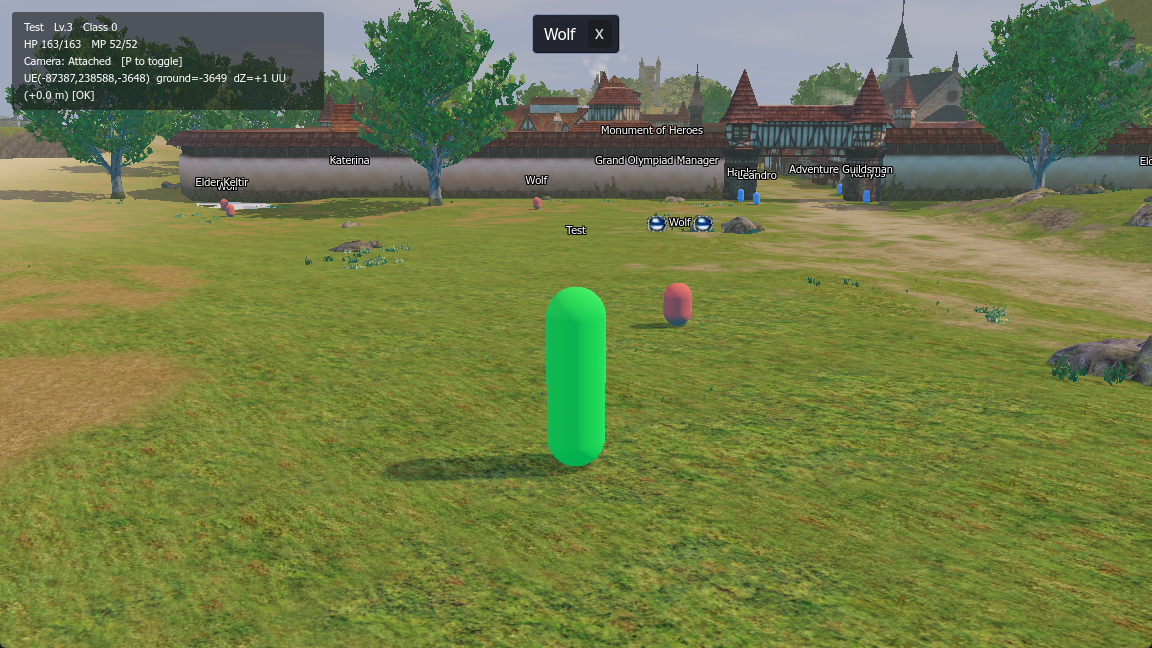
Here is the world with names on everything, and the monsters and NPCs the server placed around the town gate:
Standing on the ground
In Part 3 everything floated a little. I was placing entities at the exact height the server gives me, but the server height and my terrain surface do not line up to the centimeter, so on slopes and the beach they hovered.
The fix was to stop trusting that height for the visual and instead drop each entity onto my
own terrain. Now the little debug line in the corner reads dZ +1 UU [OK], which is my way
of saying the entity is one unit off the ground, close enough. No more floating.
Walking through walls
The next ugly thing: everyone walked straight through the buildings and the town wall. In L2 the collision is not in the client, it is in the server, in something called geodata. The server owns the truth about where you can and cannot walk, and it should, because that is what stops people from cheating.
My own geodata was terrain only. It knew the shape of the ground but had no idea a wall was a wall. I could have spent a long time turning every building mesh into collision data myself. Instead I went looking, and found an old project with the real retail Interlude geodata, covering exactly the tiles I use.
Before trusting it I checked it. The town tile, 17_25, came back with around 2800 “multi layer” blocks, which is the format’s way of storing buildings and bridges, floors stacked over floors. The empty coast tile next to it had almost none. That is exactly right, buildings only where there are buildings. I dropped the real geodata into the server, it loaded with no errors, and just like that walking into a wall stops you and the server paths you around the building instead.
The client got a lighter version of this too. I add simple collision to the building meshes on my side, but only for looks, so a monster’s name hides when it walks behind a wall, and so I can click on things. The actual “you cannot walk here” is always the server’s call.
Where this leaves me
So this is where it is now. My client speaks enough of the protocol to follow the world, the NPCs have their real names, everything sits on the ground, and the walls are solid. And the side by side video says the important part better than I can: this is the same world as the real game, running in my own engine.
It is still capsules though. The next big step is turning those capsules into the real character and monster models, using that id to model map I mentioned. That is the next step.